Knowing whether your website is performing well in Google Search requires more than simply checking your keyword rankings.
You need to understand how Google discovers and indexes your pages, which search queries bring visitors to your website, how often your pages appear in search results, and whether there are technical issues affecting your visibility.
This is where Google Search Console SEO becomes useful.
Google Search Console is a free service from Google that helps website owners monitor their website’s presence in Google Search. It provides valuable information about search performance, indexing, technical issues, search queries, and more.
In this guide, we will explain what Google Search Console is, how it supports SEO, and how to use its key reports to monitor and improve your website performance in 2026.
What Is Google Search Console?
Google Search Console is a free Google service that helps website owners understand how their website performs in Google Search.
It can provide information about:
- Search queries
- Search impressions
- Clicks
- Click-through rate
- Average search position
- Indexed pages
- Page indexing issues
- Sitemaps
- Core Web Vitals
- Mobile usability
- Links
- Security issues
- Manual actions
Google Search Console does not directly guarantee higher rankings. Instead, it provides data and diagnostic information that can help you make better SEO decisions.
What Is Google Search Console SEO?
Google Search Console SEO refers to using Google Search Console data and reports to monitor, diagnose, and improve a website’s search performance.
You can use the platform to discover:
- Which keywords generate impressions
- Which pages receive organic clicks
- Which pages are indexed
- Which URLs have indexing problems
- Which search queries have high impressions but low CTR
- Which pages are gaining or losing visibility
- Whether Google has detected certain technical issues
This makes Search Console one of the most useful tools for ongoing SEO monitoring.
Why Is Google Search Console Important for SEO?
Search Console provides first-party information about how Google Search interacts with your website.
It can help you:
Monitor Search Performance
You can see how many clicks and impressions your website receives from Google Search.
Discover Search Queries
Search Console shows the queries for which your website appeared in search results.
Identify Indexing Issues
You can investigate pages that Google has not indexed or has excluded.
Monitor Technical Problems
The platform can highlight certain technical and security issues affecting your website.
Find SEO Opportunities
Search performance data can reveal pages and queries that could benefit from optimization.
How to Set Up Google Search Console
Before using Google Search Console for SEO monitoring, you need to verify ownership of your website.
The general process is:
- Sign in to Google Search Console.
- Add your website as a property.
- Choose the appropriate property type.
- Verify ownership.
- Submit your XML sitemap.
- Allow Google time to collect data.
Depending on your setup, verification can be completed using methods such as DNS verification or other available verification options.
Once the property is verified, Search Console will begin providing data about your website.
Understanding the Performance Report
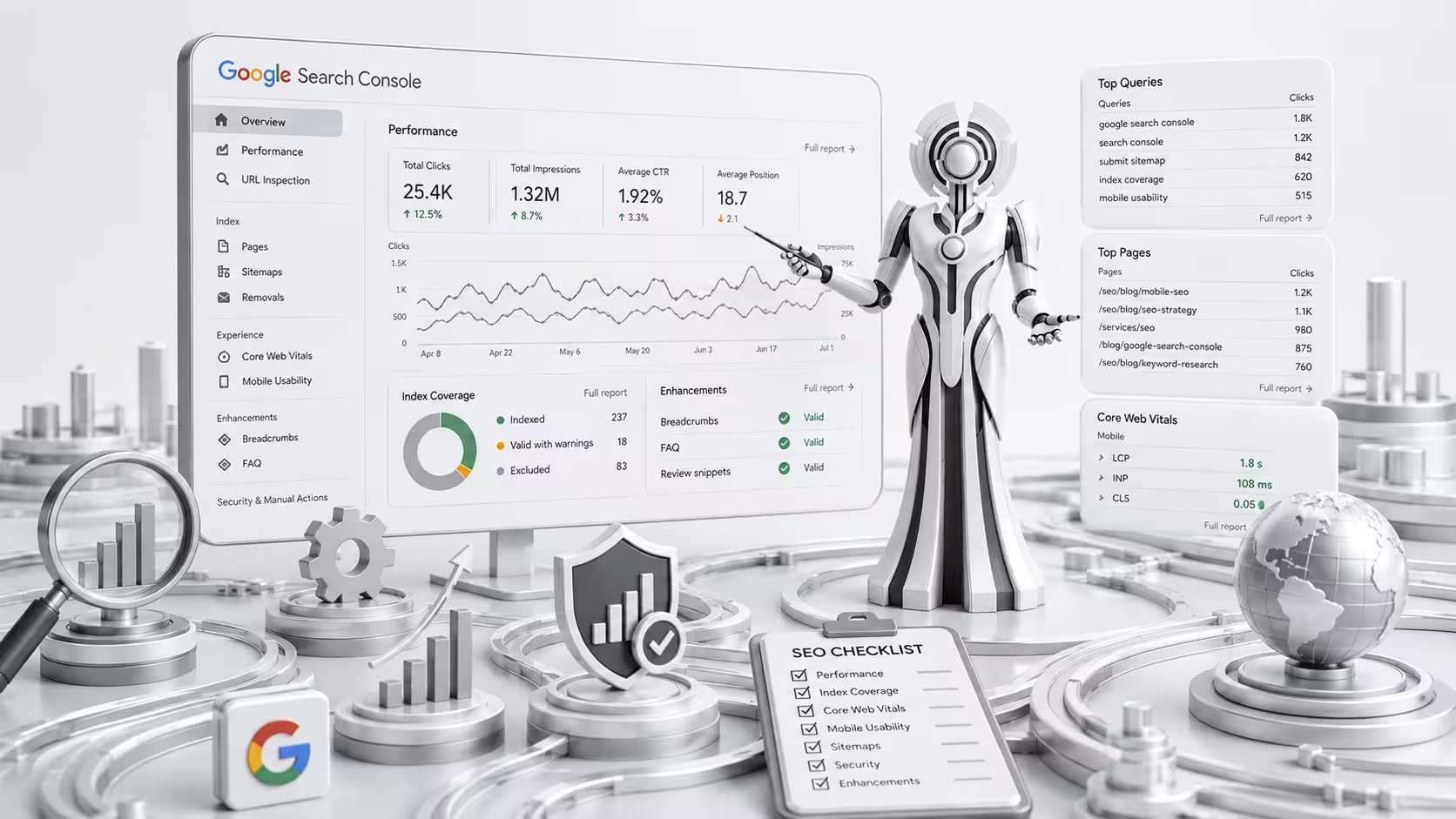
The Performance report is one of the most useful areas of Google Search Console.
It provides information about how your website appears in Google Search.
Key metrics include:
Clicks
The number of times users clicked your website from Google Search.
Impressions
The number of times your website appeared in search results.
Average CTR
CTR stands for Click-Through Rate.
It represents the percentage of impressions that resulted in clicks.
Average Position
This represents the average position of your website’s search results for the selected data.
These metrics can help you understand how visible your website is and where optimization opportunities may exist.
How to Analyze Search Queries
The Queries section can show the search terms that generated impressions and clicks for your website.
This information can be extremely useful for keyword research and content optimization.
For example, you may discover that a page receives impressions for a keyword you did not originally target.
This can indicate an opportunity to improve the page so it better addresses that topic.
Look for:
- High-impression queries
- Queries with low CTR
- Queries ranking near the first page
- Unexpected search terms
- Relevant long-tail keywords
- Queries generating conversions
Search Console can therefore provide real-world insights that complement traditional keyword research tools.
How to Find Pages With SEO Opportunities
Search Console can help identify pages that already have some visibility but could potentially perform better.
For example, look for pages that:
- Receive many impressions but few clicks
- Rank around positions 5–20
- Have declining organic traffic
- Appear for relevant queries
- Have strong impressions but weak CTR
These pages may benefit from:
- Better titles
- Improved content
- Better search intent alignment
- Stronger internal links
- Updated information
- Improved headings
- Better meta descriptions
Do not change every page simply because its position fluctuates. Analyze trends and make changes based on meaningful evidence.
Understanding Indexing
For a page to appear in Google Search, it generally needs to be accessible and eligible for indexing.
The Page Indexing report can help you understand which URLs Google has indexed and which have been excluded.
Common statuses can include:
- Indexed
- Crawled but currently not indexed
- Discovered but currently not indexed
- Excluded
- Blocked by robots.txt
- Duplicate page
- Alternate page
- Page with redirect
- Server error
Not every excluded page is a problem.
For example, some pages should intentionally not be indexed.
The important question is whether your important pages are accessible and properly eligible for indexing.
How to Check a Specific URL
The URL Inspection tool allows you to examine an individual URL.
You can use it to investigate whether Google can access and index a particular page.
This can be useful when:
- A new page is not appearing in Google
- You recently updated important content
- A page was migrated
- You want to investigate indexing
- You suspect a technical problem
The tool can provide information about the inspected URL and its indexing status.
XML Sitemaps and Google Search Console
An XML sitemap provides search engines with information about important URLs on your website.
You can submit your sitemap through Google Search Console.
Before submitting a sitemap, make sure it contains appropriate URLs and does not unnecessarily include:
- Redirected URLs
- Broken URLs
- Duplicate URLs
- URLs that should not be indexed
A sitemap can help Google discover important pages, but submitting a URL does not guarantee that Google will index it.
How to Use Search Console for Technical SEO
Google Search Console can support technical SEO monitoring by helping you identify certain problems.
Review:
- Indexing
- Crawl-related issues
- Sitemaps
- Core Web Vitals
- Mobile-related issues where reported
- Security issues
- Manual actions
For a complete technical SEO audit, you may still need additional crawling, performance, and diagnostic tools.
Search Console should be considered one part of a broader technical SEO process.
Core Web Vitals in Google Search Console
Search Console includes a Core Web Vitals report that can help website owners understand page experience data.
Core Web Vitals currently focus on:
- Largest Contentful Paint (LCP) — loading performance
- Interaction to Next Paint (INP) — responsiveness
- Cumulative Layout Shift (CLS) — visual stability
Use this information to identify pages that may need performance improvements.
If a group of pages has poor performance, investigate the underlying technical causes rather than optimizing only one URL.
How to Improve Click-Through Rate
One useful application of Search Console data is identifying pages with high impressions but relatively low CTR.
If your page is appearing frequently but receiving fewer clicks than expected, review its search result presentation.
Potential areas to improve include:
- Title tag
- Meta description
- Search intent alignment
- Content relevance
- Brand clarity
For example, a vague title may be less compelling than a clear title that directly communicates what the page offers.
However, avoid misleading titles designed only to increase clicks.
The search result should accurately represent the content users will find after clicking.
How to Monitor Search Position
Search Console can help you monitor changes in average search position.
Do not focus too heavily on a single day’s position.
Instead, look for meaningful trends over time.
For example:
Positive trend: A page moves from positions 18–20 toward positions 8–12.
Potential concern: A previously stable page experiences a sustained decline in impressions and clicks.
Search rankings naturally fluctuate, so context matters.
Compare:
- Date ranges
- Queries
- Pages
- Devices
- Countries
- Search types
This provides a more complete picture.
Search Console and Keyword Research
Google Search Console can complement your keyword research process.
Traditional keyword research tools help you discover potential keywords before creating content.
Search Console shows queries for which your existing website actually receives impressions and clicks.
This means you can use Search Console to discover:
- New keyword opportunities
- Long-tail searches
- Related queries
- Unexpected rankings
- Content gaps
- Pages with untapped potential
For example, if an article receives impressions for several related searches, you may be able to improve the article by addressing those topics more clearly.
Search Console and Content Optimization
Search Console data can help guide content updates.
Suppose an article targets one primary keyword but receives impressions for several related queries.
Review those queries and ask:
- Are they relevant?
- Does the article answer them?
- Should a new section be added?
- Should another article be created?
- Is the current search intent different?
Do not add every query to the article.
Only expand the content when doing so genuinely improves the page for users.
Using Search Console to Find Content Gaps
Search Console can also reveal topics your website is appearing for without having dedicated content.
For example, your existing pages may receive impressions for a related topic that is not directly covered.
If that topic is important to your audience and business, it could become a new content opportunity.
This can help you build a more targeted content strategy based on actual search behavior.
How to Monitor SEO Performance Over Time
SEO performance should be monitored consistently rather than checked only when rankings fall.
Create a simple monitoring routine.
Weekly
Review major changes in:
- Clicks
- Impressions
- Important pages
- Important queries
Monthly
Analyze:
- Organic search trends
- Top-performing pages
- New keyword opportunities
- Declining pages
- CTR opportunities
- Indexing issues
Quarterly
Perform a broader SEO review covering:
- Content performance
- Technical SEO
- Search visibility
- Competitors
- Internal linking
- Content gaps
- Conversion performance
The exact schedule can vary depending on the size and activity level of your website.
Common Google Search Console SEO Mistakes
Checking Rankings Every Day
Daily fluctuations do not necessarily indicate a meaningful SEO change.
Trying to Index Every URL
Not every URL needs to appear in search results.
Requesting Indexing Repeatedly
Requesting indexing is not a substitute for fixing technical or content problems.
Ignoring Search Intent
Search Console tells you what queries generate visibility, but you still need to understand why users are searching.
Focusing Only on Clicks
Impressions, CTR, conversions, and page-level trends can also provide valuable insights.
Ignoring Declining Pages
A sustained decline in clicks or impressions can be an opportunity to investigate and improve content.
Treating Every Warning as a Critical Error
Some reports identify issues that may not require immediate action.
Always consider the actual impact on important pages and users.
Google Search Console SEO Checklist
Use this checklist to monitor your website:
- Website is verified in Google Search Console
- XML sitemap is submitted
- Important pages are indexed
- Indexing issues are reviewed
- Search queries are monitored
- Clicks are tracked
- Impressions are tracked
- CTR is reviewed
- Average position is monitored
- High-impression pages are analyzed
- Low-CTR opportunities are identified
- Core Web Vitals are reviewed
- Important URLs are inspected
- Search performance trends are compared
- New keyword opportunities are identified
- Declining pages are investigated
- Content gaps are identified
- SEO improvements are tracked over time
Final Thoughts
Google Search Console SEO is an essential part of monitoring and improving your website’s organic search performance.
The platform provides valuable insights into search queries, clicks, impressions, CTR, indexing, Core Web Vitals, and other aspects of your website’s presence in Google Search.
However, the real value comes from how you use the data.
Instead of checking rankings without context, use Search Console to identify opportunities, investigate problems, understand user search behavior, and make informed SEO decisions.
Combine Google Search Console with strong content, technical SEO, keyword research, internal linking, and ongoing optimization to build a stronger foundation for long-term organic search growth.